A complete AI glossary. From chatbots to AI agents
If you've started using ChatGPT, Copilot or Claude at work, you'll have heard colleagues talk about prompts, tokens, agents and jailbreaks. This is a plain-English guide to the words that matter, what each one means for the safety of your data, and what we'd do about it.
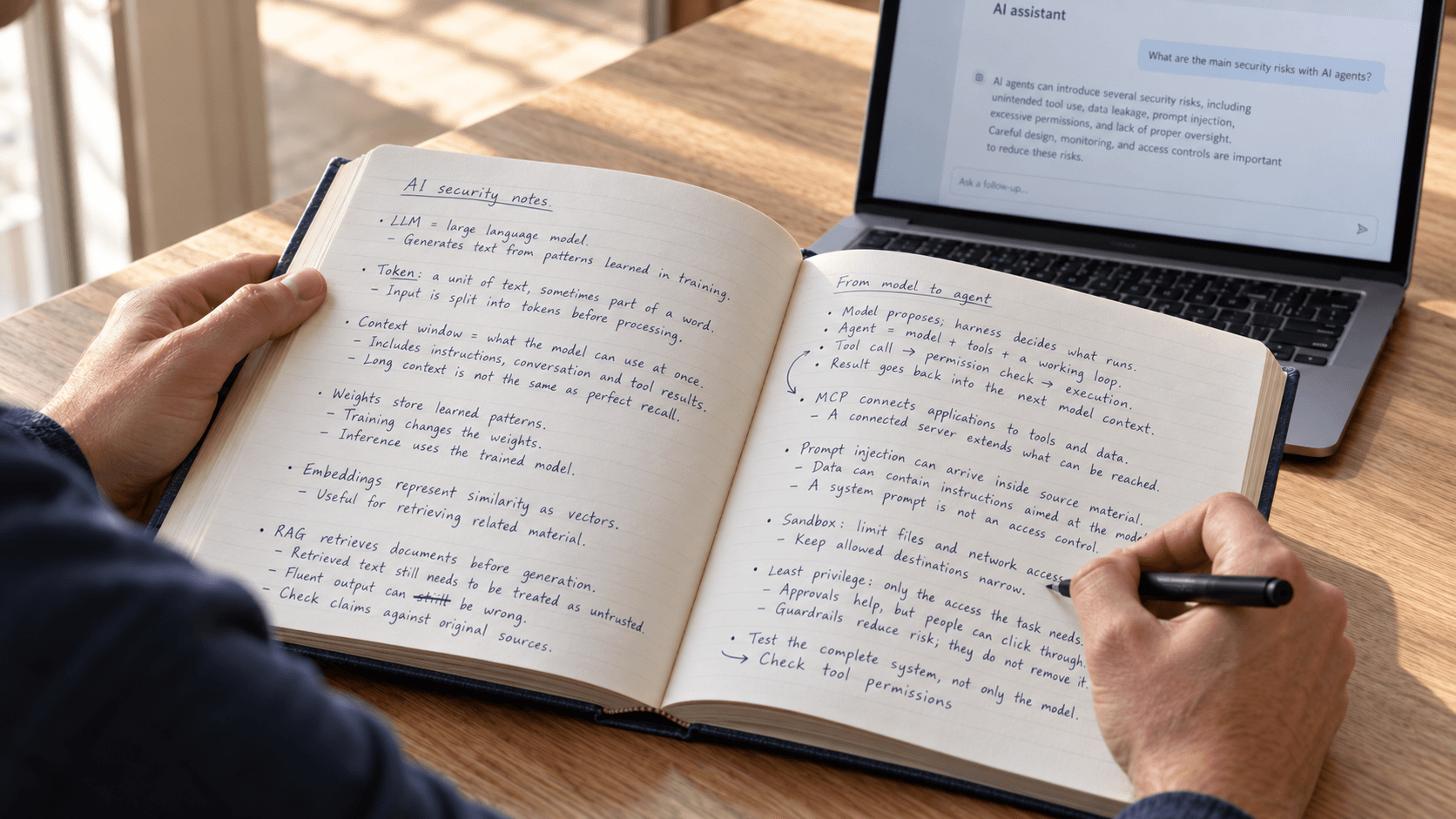
A couple of years ago, AI at work mostly meant a chatbot you typed questions into. Now assistants built into everyday office software can draft emails, summarise documents and fill in spreadsheets, and more and more of them carry out whole tasks on their own. The words have arrived just as fast. Many of them didn't exist three years ago, and people use them in meetings as if everyone already knew what they meant. This glossary is for anyone who's comfortable with a computer and wants to understand the AI side without a technical background. It starts with the basics and works up, and each part opens with a real case that shows why its words matter. We last updated it on 21 October 2026 and we'll keep adding to it.
Why the words matter
In April 2026 a security researcher, Aonan Guan, published how he'd tricked three AI assistants that programmers use on GitHub, a website where software teams keep and review their code. He didn't break into anything. He wrote his own instructions into places the assistants would read, such as the title of a proposed change or a comment hidden from human eyes, and the assistants followed them. Two of them posted their secret access keys, the passwords that let software log in to other services, where anyone could see them. The third hid its keys inside a file it added to the project, which got them past the filter meant to catch exactly that (Guan, 15 April 2026).
To the assistants, the attacker's words looked like any other instructions. Anthropic, whose tool was one of the three, told Guan that "The action is not designed to be hardened against prompt injection", which is the name for this kind of trick. Its fix was a setting in the software around the AI, not a change to the AI itself. That surrounding software has a name too, the harness. Once you know those two words, you can follow most conversations about AI security.
A note on sources. A lot of the best evidence about how AI fails comes from the companies that make it, so we say who each source is. Where independent sources exist, such as the UK's National Cyber Security Centre (NCSC) and AI Security Institute (AISI), we use them. We sell AI security services ourselves and we're building a product in this area, so our opinions are marked as ours.
The basics

When the EU wrote its AI Act, it had to put into law what counts as AI. The definition it settled on, in Article 3, is deliberately broad (EU AI Act). A bank's system for scoring loan applications and a chatbot that can read your inbox both count, and the law then treats them very differently. That's why "AI" on its own tells you so little, and why the five words below are worth getting straight first.
Artificial intelligence (AI)
AI is the umbrella term for computer systems that do things we'd normally expect a person to do, such as recognise speech, sort documents or write a reply. The idea is old, and the name dates from 1955. The EU's legal version, in short, is a machine-based system that works out from what it's given how to produce things like predictions, content, recommendations or decisions (EU AI Act).
When a supplier says their product "uses AI", ask what kind. A tool that flags unusual card payments and an assistant that reads your email carry completely different risks.
Machine learning (ML)
Machine learning is how most modern AI gets built. Instead of a programmer writing every rule, the system learns from examples, the way an email spam filter learns what junk looks like. The catch is that whoever controls the examples can shape the behaviour, and there's no list of rules you can open and read to see what the system will do.
Deep learning
Deep learning is a powerful kind of machine learning that uses many layers of artificial "neurons", loosely inspired by the brain. Three of its pioneers, Yann LeCun, Yoshua Bengio and Geoffrey Hinton, wrote the best-known overview of it in Nature in 2015 (Nature). For security it has one big downside. A deep-learning model is billions of numbers, not instructions anyone can read, so the only way to know how it behaves is to test it.
Generative AI
Generative AI creates new content, such as text, images, audio, video or computer code, where older AI mostly gave a score or a yes-or-no answer. ChatGPT, Copilot and Claude are all generative AI. NIST, the US standards body, lists twelve risks it creates or makes worse, from making things up to weakening information security (NIST).
The everyday risk is trusting the output too quickly. And that's easy to do, because it usually looks right. A generated formula can go straight into a spreadsheet, and generated code can go straight into a live system. OWASP, a non-profit that publishes security guidance, lists failing to check AI output among the top ten risks for AI applications (OWASP). We'd treat anything it produces as a draft from a new colleague, useful but in need of checking.
Large language model (LLM)
A large language model is the engine inside a chatbot. It's been trained on an enormous amount of text and works by predicting what should come next, a bit like the predictive text on your phone on a vastly bigger scale. OpenAI's GPT, Anthropic's Claude and Google's Gemini are all LLMs. Most are built on a design Google researchers published in 2017 (Vaswani et al.).
One fact about LLMs explains most of this glossary. An LLM carries on from the text it's given, and it can't reliably tell which parts came from you and which came from a stranger.
Inside a model

In October 2023 researchers from Princeton, Virginia Tech, IBM and Stanford took GPT-3.5 Turbo, one of OpenAI's main models at the time, and removed its safety training. They didn't hack anything. They used a paid feature OpenAI offers its customers, which lets you teach the model with your own examples. They gave it ten examples and spent less than $0.20 (Qi et al.). The model's rules weren't stored somewhere you could lock, like a protected cell in a spreadsheet. They were part of the same learned numbers as everything else.
This part explains what a model is made of and what it can see while it works.
Token
A token is the small chunk of text an AI reads and writes, usually part of a word. OpenAI's rule of thumb is about four characters of English per token (OpenAI). Paid AI services charge by the token, and they use tokens to measure how much an AI can take in at once. If a public chatbot on your company's website can be kept busy with very long requests, someone else can run up your bill, a risk OWASP calls unbounded consumption (OWASP). Spending caps and limits for each user stop it cheaply.
Weights (parameters)
Weights, also called parameters, are the billions of numbers a model learns during training. Together they are the model, the way a finished Excel workbook is all of its cells and formulas. Copy the file of weights and you have the whole model. That makes it valuable, and a 2024 RAND study counted 38 distinct ways attackers might try to steal one (RAND).
For most people the risk runs the other way. Some model files can run hidden code the moment you open them, much like a Word document with a malicious macro (Hugging Face). Treat a model file from an unknown source the way you'd treat an email attachment from a stranger.
Training, fine-tuning and RLHF
Training is how a model learns. First it reads a huge amount of text, which is called pre-training. Then fine-tuning teaches it with a smaller, chosen set of examples, such as a company's own documents or house style. RLHF, short for reinforcement learning from human feedback, is the stage where people rate its answers so that it learns to behave like a helpful assistant.
As the study at the top of this part showed, the process that teaches good behaviour can also undo it, and the same researchers found that even harmless examples can weaken a model's safety (Qi et al.). If a supplier offers to train a model on your company's data, ask how they check it still refuses what it should.
Inference
Inference is the technical word for using a trained model, every time you ask a question and get an answer. It's also the moment the AI reads whatever you, or anyone else, feeds it, which makes it the right moment to keep a record. The NCSC suggests logging enough to spot trouble, including what went in, what came out and which tools the AI used, and points out that failed attempts can be an early sign of an attack (NCSC).
Context window
The context window is everything the AI can see at once while it answers. That's your instructions, the conversation so far, any documents or emails you've shared, and its own reply. Think of it as the AI's desk. Anthropic calls it the model's working memory, gives its newest Claude models room for about a million tokens and warns that accuracy drops as the desk fills up (Anthropic).
Two things follow from that. Anything on the desk can carry instructions the AI might follow, including a forwarded email or a web page it was asked to read. And when a long task fills the desk, older material gets squeezed out, so a rule you gave at the start may not survive to the end.
Embeddings and vector databases
An embedding turns a piece of text into a list of numbers that captures its meaning, so a computer can find documents about the same thing even when they use different words. A vector database stores those lists. Together they're what lets a company's AI assistant search its own files (see RAG below).
People tend to assume those numbers are anonymous. They aren't. In a 2023 study researchers turned embeddings back into the original text, recovering 92% of short passages word for word, and full names from medical notes (Morris et al.). Protect a vector database as carefully as the documents it was made from.
Open-weight model
An open-weight model is one you can download and run on your own computer, instead of using it over the internet. OpenAI's gpt-oss, released in August 2025, is one (OpenAI). The upside is that your data stays with you. The downside is that anyone can retrain it to strip out its safety rules. OpenAI tried that on its own model and reported that even the stripped versions stayed below the level it treats as high risk, though it's OpenAI's own test, with outside experts reviewing the method.
It also makes a difference where you download a model from, as the next entry explains.
Abliteration
Abliteration is a way of removing an open-weight model's ability to say no, and free tools now do it in roughly one command. The results are often labelled "uncensored" or "unrestricted". People want them for plenty of legitimate reasons, which is exactly why they make good bait.
How models go wrong

Ask an AI coding assistant to fix a problem and it may tell you to install a piece of software that doesn't exist. In a study presented at the USENIX Security conference in 2025, researchers collected 576,000 samples of AI-written code from 16 models and found 205,474 different made-up software names in them (Spracklen et al.). So that's an opening for criminals. Whoever registers one of those names first gets their software installed by anyone who follows the AI's advice without checking.
That's an AI getting something wrong on its own. The failures that worry us more are the ones someone else causes, by hiding instructions in an email or a web page, talking the AI out of its rules, or tampering with what it learns from. They all come back to the same weakness. An AI reads everything as text and can't reliably tell an instruction from information.
Hallucination
A hallucination is when an AI gives a fluent, confident answer that's simply wrong, such as an invented statistic, a quote nobody said or a court case that never happened. NIST calls it confabulation. OpenAI's September 2025 research blames the way models are trained and tested, which rewards a lucky guess over saying "I don't know". On one test, one of its models got slightly more answers right than another (24% against 22%), but gave a wrong answer 75% of the time, against 26% (OpenAI).
In code, made-up answers turn into a security problem, as the start of this part showed. In that study at least 5.2% of the software suggested by commercial models didn't exist, and 21.7% of what open-source models suggested (Spracklen et al.). Check facts, figures and names before they go into anything important.
Prompt injection
A prompt is what you type to an AI. Prompt injection is when someone hides their own instructions in something the AI reads, so that it follows them instead of you. It can be as simple as a line of white text in an email or document telling the AI to ignore its previous instructions and forward this conversation to someone. You'd never see it, but the AI would. That's how the GitHub assistants at the top of this article were caught.
The NCSC explains why it's so hard to fix. Older attacks of this kind could be blocked by keeping instructions and data strictly apart, and a language model has no such separation. So the NCSC warns that prompt injection "may never be totally mitigated in the way that SQL injection attacks can be" (NCSC, 8 December 2025). OpenAI said much the same two weeks later (OpenAI). Companies are making the attacks rarer. In November 2025 Anthropic reported that about 1% of attempts succeeded against its latest model working in a web browser, and added that "No browser agent is immune to prompt injection" (Anthropic). The practical answer is to limit what an AI can reach, so that a successful trick can't do much.
Jailbreak
A jailbreak is talking an AI into doing something its maker trained it to refuse, often through role-play or clever wording. The difference from prompt injection is who's being attacked. In a jailbreak the person typing goes after the AI's rules. In an injection a third party goes after you, the user. Jailbreaks become your problem when the public can talk to an AI that carries your company's name, such as a chatbot on your website.
The UK AI Security Institute found universal jailbreaks, tricks that work on almost any request, in every system it tested for its December 2025 report. They are getting harder to find. For requests about misusing biology, the time needed to find a jailbreak rose about 40-fold between two models released six months apart (AISI).
Data poisoning
Data poisoning is slipping bad material into what an AI learns from, or into the documents it looks things up in, so that it misbehaves later. It takes far less than you might expect, and the hidden behaviours it can plant are covered next. Tampering with the documents an AI searches is easier still. In a study presented at USENIX Security 2025, researchers planted just five misleading texts per question in a collection of millions and got the AI to give their chosen answer 90% of the time (Zou et al.).
Backdoor
A backdoor in an AI model is a hidden behaviour that stays dormant until something sets it off, such as a particular phrase, a type of task or the moment the AI is given access to email or files. Until then the model behaves perfectly normally. Anthropic's research found that standard safety training doesn't reliably remove one (Hubinger et al.), and planting one has become cheap.
From chatbot to agent

Flowise is a free program people use to build their own AI assistants by dragging boxes around a screen. One of those boxes, the one that connects an assistant to outside services, carried out whatever settings it was given without checking them. The flaw was rated 10 out of 10, the most serious score there is (NVD). It was disclosed in September 2025 and a fixed version came out, but in April 2026 attackers started using it, at a time when 12,000 to 15,000 copies of Flowise were reachable from the internet (BleepingComputer).
The mistake itself is an old one. What's new is what it sits next to. A chatbot that gets something wrong gives you a bad answer. An AI agent can act on the mistake, with whatever access you've given it. This part explains how AI got from answering questions to doing tasks.
Tool use (function calling)
Tool use is when an AI asks the software around it to do something for it, such as search the web, look up a record or send an email, and then reads the result. The AI only writes the request, and the software decides whether to carry it out. This is the point where an AI goes from saying the wrong thing to doing it. OWASP calls the risk excessive agency and traces it to three causes. The AI has tools it doesn't need, it has more permissions than the job requires, or it takes important actions with nobody checking (OWASP).
AI agent
An agent is an AI that works through a task by itself. You give it a goal, and it decides on a step, uses a tool, looks at the result and decides what to do next, again and again, until it's done. Anthropic draws a useful line between workflows, where the steps are fixed in advance, and agents, where the AI chooses its own path (Anthropic). You'll meet three kinds at work:
- Coding agents write and change software for developers. Examples include Anthropic's Claude Code (Anthropic), OpenAI's Codex (OpenAI) and GitHub's Copilot cloud agent (GitHub).
- Business agents handle office processes. In Microsoft Copilot Studio, for example, an agent can start when something happens and run a task without anyone stepping in (Microsoft).
- Personal agents run on your own computer through the email, files and chat accounts you connect to them. OpenClaw is a well-known open-source one.
Whatever the kind, an agent turns a mistake, or an attacker's hidden instruction, into a real action taken with your accounts. OWASP now publishes a separate top-ten list of risks just for agents (OWASP).
Harness
The harness is the software wrapped around an AI model that turns it into an agent. It gives the AI its tools, decides what goes on its desk and enforces the rules about what it may touch. Anthropic's documentation puts it neatly: "Claude Code is the harness; Claude is the model inside it" (Anthropic).
We think it's the most useful word in this glossary, because it tells you where the safety controls live. The AI only suggests actions. The harness decides what happens, with which accounts and inside which limits. When Anthropic fixed the GitHub problem at the top of this article, it changed a harness setting. Guan's advice to everyone else was the same kind of fix, giving each agent only the tools, secrets and internet access it clearly needs.
MCP (Model Context Protocol)
MCP is a common standard for plugging AI assistants into other services, such as your email, calendar, files or a company database, a bit like a USB port for AI. A company builds one MCP connection for its service, and any compatible assistant can use it, from ChatGPT and Gemini to Cursor and Visual Studio Code (Anthropic). Anthropic created it, and since December 2025 it has been run under the Linux Foundation, a non-profit.
Each connection you add puts more outside text on the AI's desk, where hidden instructions can ride along, and some connections are programs running on your own computer with your permissions. The standard's own security guidance spends a lot of space on what can go wrong (MCP). Real flaws have turned up too, including the Flowise one above and another, rated 9.6 out of 10, in a popular MCP add-on called mcp-remote (NVD). We'd connect only services you trust, and only the ones you need.
A2A (Agent2Agent protocol)
A2A is a standard that lets AI agents from different companies talk to each other, in the way MCP connects them to tools. Google introduced it in April 2025 (Google) and the Linux Foundation took it over that June (Linux Foundation). A message from someone else's agent is like an email from a stranger. It can carry hidden instructions, so treat it with the same caution.
RAG (retrieval-augmented generation)
RAG is how a company's AI assistant answers questions from the company's own documents. When you ask something, it first searches your files, then puts the most relevant pieces on its desk and answers from them. The idea comes from a 2020 research paper (Lewis et al.). Two things need care. The search has to respect who's allowed to see what, or the assistant becomes a way to read files you couldn't open yourself. And any document it pulls in can carry hidden instructions.
Lethal trifecta
The lethal trifecta is the developer Simon Willison's name for a dangerous combination. An AI that can read your private data, also reads content from strangers, such as incoming email or web pages, and can send information out, can be tricked into sending your data to an attacker (Willison). Meta turned this into a rule in October 2025. Until these tricks can be reliably detected, an agent must never have all three in one session (Meta). The GitHub assistants at the top of this article had all three.
Vibe coding
Vibe coding is building software by describing what you want to an AI and accepting whatever it writes without reading it closely. It lets people with no programming background build small apps and tools. For a quick personal project that's fine. For anything that holds customer data or real money, someone who understands the code needs to check it, because it carries every risk in this part, from made-up software names to hidden instructions.
Defences
In February 2025 Anthropic put its newest filter against jailbreaks online for a week and offered prize money to anyone who could get past all eight levels of a challenge. Across more than 300,000 chats, 339 people got through at least one level. Four got through all eight, one of them with a jailbreak that worked across the board, and Anthropic paid out $55,000 (Anthropic). That was a well-funded company testing its own best filter, in public.
Filters make attacks less likely. They don't make them impossible. So the safeguards that matter most are the ones that limit the damage when something gets through, much as a locked filing cabinet still protects its documents after someone has walked into the office. We'd use both kinds and rely on the second. The terms below run roughly from the weakest safeguard to the strongest.
System prompt
The system prompt is the set of standing instructions a company gives its AI before you type anything, along the lines of you are a helpful assistant for our bank, never discuss other banks. You usually can't see it. OWASP warns against treating it as a secret or as a security control (OWASP), because it can leak. Never put passwords or confidential rules in one, and write it as if it'll end up published.
Guardrails
Guardrails are filters wrapped around an AI that check what goes in and what comes out, blocking attacks or harmful content. We think they're a good start, and they aren't enough on their own.
The filter in the challenge above was Anthropic's Constitutional Classifiers. In Anthropic's own automated tests it cut successful jailbreaks from 86% to 4.4% (Anthropic). Determined attackers do better. In October 2025 researchers from Anthropic, Google DeepMind, ETH Zürich and other institutions broke 12 published defences, most of them more than 90% of the time (Nasr et al.). Use guardrails to cut down attacks and raise alerts, and don't let anything important depend on them.
Human-in-the-loop (HITL)
Human-in-the-loop means a person has to approve an AI's action before it happens, the "Allow" or "Deny" box you've probably clicked. Of all the standard advice about AI safety, we think this is the most oversold. It only works if the person has the time, the context and the confidence to say no, and a steady stream of pop-ups wears all three down.
Anthropic found in March 2026 that people using its coding agent approved 93% of permission requests, which it calls approval fatigue. Even the automatic checker it built to take over most of those decisions missed 17% of actions that went further than the person had asked, in a test of 52 real cases (Anthropic). The EU AI Act recognises the problem too. It requires high-risk AI systems to be built so that the people overseeing them stay aware of automation bias, the habit of trusting a system's output too readily (EU AI Act).
Ask for approval where the damage would be real, such as payments, deletions and messages leaving the company, and make sure the box says exactly what will happen. Back it with a hard limit in the software for the day someone clicks yes without reading. Fewer prompts help as well. Running Claude Code in a sandbox (next entry) cut Anthropic's own count of prompts by 84% (Anthropic).
Sandbox
A sandbox is a sealed-off area where an AI can work without reaching the rest of your computer or network, like letting a temp work in a meeting room with only the files they need. Anthropic's engineers say it needs two walls, one around your files and one around the internet. Without both, a tricked AI can send your login keys away or find a way out (Anthropic). Even then, any route out that's left open can leak data. In the GitHub case, one assistant's keys left through github.com itself, a site its own firewall allowed.
Least privilege
Least privilege is an old security rule that fits AI well. Give each AI assistant only the access its job needs, and only for as long as it needs it, the way you'd give a contractor a key to one room and not the whole building. The NCSC's version for AI is that when a model reads someone's content, it should have no more power than that person (NCSC).
In practice we'd start with read-only access, allow a short list of approved tools instead of trying to block the bad ones, use access that expires and keep a record of what the AI does. Blocking falls short, and Guan showed why. When Anthropic blocked one command, he found another that could reach the same secrets.
Red-teaming
Red-teaming is attacking your own systems on purpose, with permission, to find the weak spots before a real attacker does. For AI it means trying prompt injection, jailbreaks, data theft and misuse of tools against the whole setup, including the AI, the software around it, the services it's connected to and the people who approve its actions. Red-teaming is part of what we sell (our AI and LLM security work includes testing for prompt injection), so weigh our enthusiasm accordingly.
Evals
Evals, short for evaluations, are structured tests that check what an AI can do and how it behaves. The UK AI Security Institute built a free tool for running them, called Inspect, with Meridian Labs (Inspect). Public scoreboards compare models in general. The test worth having is one built around your own tasks and your own data, and rerun whenever the AI or its settings change.
The word everyone argues about
If you follow AI news, you'll see this term more than any other on the list. It's in company charters, in a contract between OpenAI and Microsoft and in most predictions about where AI is heading. For keeping your data safe, it matters less than anything above.
Artificial general intelligence (AGI)
Artificial general intelligence usually means an AI that can do most things a person can, at least as well. There's no agreed definition. OpenAI's charter describes highly autonomous systems that beat people at most economically valuable work (OpenAI), and Google DeepMind researchers proposed five levels instead, from emerging to superhuman (Morris et al.). It has even shaped a contract. In October 2025 OpenAI and Microsoft agreed that an independent panel would have to confirm any claim that AGI had arrived (OpenAI), and in April 2026 they took that condition out of their payment terms (OpenAI).
What should shape your safeguards is what today's AI can already do. In the UK AI Security Institute's tests, AI models could complete apprentice-level cyber security tasks less than 9% of the time in late 2023, and 50% of the time by late 2025. In 2025 the institute tested the first model able to finish tasks that would normally take an expert with more than ten years' experience (AISI).
How the terms fit together
Read in order, the glossary tells one story. An AI reads everything on its desk and can't tell your instructions from a stranger's. Tools and a harness turn it into an agent that can act, and standards like MCP connect it to more and more of your accounts. Filters and approval boxes make an attack less likely, and sandboxes and limited access keep the damage small when one gets through.
That last layer is what we work on at RedVault. We're building AgentShield to show companies what the AI agents on their computers are doing, and to help them protect their data and their users from agents behaving in ways nobody intended.